Showing posts with label magik. Show all posts

Saturday, January 8, 2011

Web Emacs : ( Magik XMPP )

I have been thinking of instant messaging and presence technology in Smallworold from long time. With lot of searching I found XMPP

Xmpp is a protocol used in instant messaging and it’s a open standard for communication protocol, supported by Gtalk, Facebook, twitter, etc..


Even thought it’s a protocol for instant messaging it is best suited for writing any web services. The below is video is a web Emacs application uses Google talk client in web gmail, xmpp server in google app engine (GAE), and Smallworld applications.
The protocol is for extensible instant messaging, presence information.. The presence technology has wide usages.

Web services using XMPP provides lot of advantages when compared with conventional SOAP Services. (See the table) 
The current video demonstration has three parts… a web client, a XMPP server running in Google cloud and a Magik XMPP service running in Smallworld session.

XMPP Magik service is combination of magik + java Smack API.. its a open source client library for instant messaging and presence
The demo is sample example of how we can use xmpp, butt is usage is only limited by the imagination of developer.


Sunday, November 28, 2010

FunDay... Magik Mindreader

Magik Mind Reader reads your mind...

download magik_tric.zip..
Extract it..
Compile magik_tric.magik..
and say magik_tric.open() on Emcs

Press "Help" button and follow the steps.. Enjoy the FUN..

crack the logic before looking in to source code..  it took 3 hrs to develop this.. :)

Sunday, October 10, 2010

Playing OLE

Many times programming for ole_objects is a tedious job. creating a object and checking help on it. and trying on emacs .

But there is a shortcut which will make the life easy while working with excel, word, powerpoint from magik.

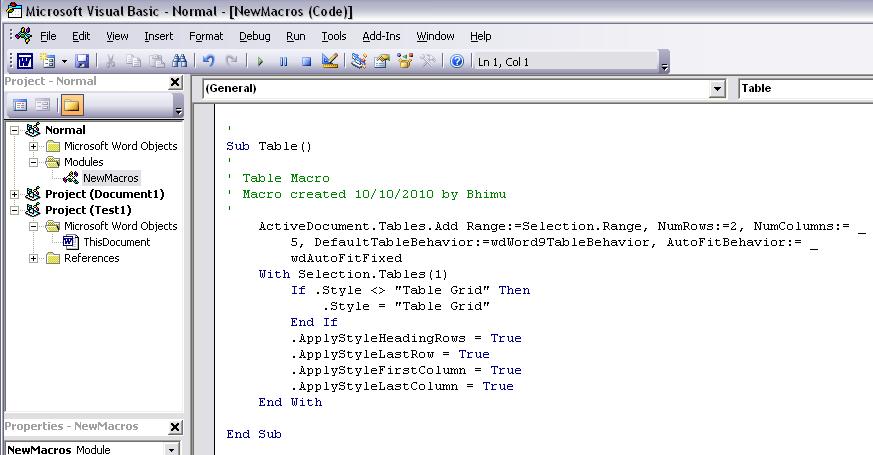
Microsoft Office comes with macro recorder and editor(VBA Editor) which will do 70% of our work if we trying to add something to office applications from magik.

for eg: I have to add table to the MS word. but dont know how?? Macros will help a lot... here is the example

Step 1: Start office App( word, excel, Powerpoint) i use MS word here.
Step 2: Go to Tools -> Macro -> Record New Macro.
Step 3: Give the name to Macro (Tablemac). Slect "OK" (Fig 1)
Step 4: Go to Table -> Insert -> Table and select "OK".
Step 5: Select Stop Recording . (fig 2)
Step 6 : Go to Tools -> Macro -> Macros (Alt+F8)
Step 7. Select the Macro and click Edit. This will opens the VB Editor with the code for inserting Table to MS word. as shown in figure

The code generated will some times canbe used as it is. or will do 70% of the work.  if is possible to call a macro from Emacs. most of the work is done.

The code generated will be use full not only in magik but also while dong Ole_program from java, phyton. etc..


Saturday, September 25, 2010

Bingoho Source code (Experimental)

Download  Bingoho source code from here

This application is just a experimental.. Coordinate system synchronization is not 100% accurate.

Usage of BingMaps in current application  is just a geoImaginary and geocoding services.. Didn't try with tile server implementation.

Works on any application with simple gui,config.xml configuration.

If application is behind firewall, c# code has to be recompiled with proxyObject class which is provided with source code.

If any one fixed the issues within this source code please share to me. :)

Interested to see if any one fixes the coordinate system synchronization


Tuesday, September 14, 2010

Magik Ganesh

I wish you all a Happy Ganesh chaturdhi

1. Start outlook if you have on the machine
2. Download magik file form here. say magik_ganesh.open() on emacs.

program doesn't contain any virous. just access the name from out look. Select "Allow" button in security shown in outlook.

Happy Vinakaya Chavathi .. [Name in Outlook ]. This app is similar to few flash application available

Wednesday, December 2, 2009

SW Media Player

sw media player is a simple media player(only audio)
This again works using ole_automation by geting handle on windows media player activex component. ( so becomes platform dependent )


I added lot of actions but couldn't implement all...
it has the basic functionality like play, stop, ff, fr, pause.
Time seek will show the current position of the audio file but it doesn't update if we drag it.

It will work from emacs with three lines of code

.player << ole_client.create_object("wmplayer.ocx")
.control << .player.controls
.player.url << "C:\WINDOWS\Media\Windows XP Logon Sound.wav"

Serves as online radio if URL is replaced with some live radio for eg: live365.com

Download sw mdia player form here

control.stop will stop playing audio file. similarly play, pause etc are available on control class.

I tried to add play list to the tree item with add and remove functionality but finally did nothing

If found any new ideas please add to comments

Sunday, November 8, 2009

Add behavior to Tree Item

I am a big fan of tree_item and Tree_item is one of the most powerful controls provided by magik language. I can't imagine many Office applications with out a tree_item (very few without a tree_item)


From few days I am trying to develop a Yahoo messenger kind of application in magik using tcp/ip communication.

One of my requirements is to show details on mouse over on the list available. But I think the tree_item doesn’t have mouse over functionality added (at least in my scope of knowledge). I spend couple of minutes to provide a customized behavior like mouse over action to tree_item

Here is the way to add the mouse over behavior to tree_item:
(These changes are to tree_agent.magik didnt tried subclassing it)
1. add a pseudo slot say mouse_over_func and define the slot access to writeable
2. add the mouse_over_func to exported_notifiers and notifier_for_action
3. initilise the handler in init() of agent as below
.mouse_over_func << handler.new(_self, :default_mouse_over|()|)
4. enable the events for the tree in window.enable_event(:move)
5. in default_handle_event(), notify to the desired method as below
_if l_id _is :move
_then

_return _self.notify(:mouse_over_func, l_row, l_row_index, p_event)

_endif
6.
_pragma(classify_level=advanced)
_private _method tree_agent.mouse_over_func << p_new
##
##


.mouse_over_func << handler.new(_self, :default_mouse_over|()|)
>> .mouse_over_func
_endmethod
$

7.
method tree_agent.default_mouse_over(p_tree, l_row_index, p_event)
##
##
#write(p_tree, l_row_index, p_event)

_local l_sel_column << _self.column_at(p_event.x)
#do some thing
write(l_sel_column)
_if l_sel_column _is _unset
_then
_return

_endif


_endmethod
$

I just tried this code and I haven’t tested fully… but this is working. I added my custom method in the class as we do for select notifier or double click notifier.. it is working with few tracebacks.. Those are to be handled in tree_agent. default_mouse_over()

Friday, November 6, 2009

sw_narrator

“SW Narrator” is a simple application which reads any action performed on smallworld application. it is as simple as Narrator provided by default in windows operating system. This is developed in magik by using SAPI.

Interestingly heart of the application is only 2 lines

MagikSF> v << ole_client.create_object("sapi.spvoice")
$

MagikSF> v.Speak("smallworld")

Sw narrator gets every action performed by application by add_filter_event to :interaction_mode_event. This will give handle to action and there it retrieves the UI value.

Code written in click_monitor in development tool serves the purpose.

Looking for some online drive to upload the module… I will update once I shared the module.

Thursday, November 5, 2009

Draw 3D pie diagram in Excel from magik


This piece of code will help to draw a 3d pie diagram in excel sheet from magik..


_block

e << OLE_Client.Create_Object("Excel.Application")
w << e.Workbooks()

w.add()
s << e.Sheets("Sheet1")
s.Name << "bhimu"
_for i _over range (1,10)
_loop
Cell << S.Range ("A"+i.print_string)
Cell.Value << i
Cell.Release_Object ()
Cell << S.Range ("B"+i.print_string)
Cell.Value << "=A"+i.print_string+"*"+"A"+i.print_string
Cell.Release_Object ()
_endloop


s.range("A1:B10").select
c << e.charts.add
c.ChartType << :|xl3DPieExploded|
e.ActiveChart.Location(:|xlLocationAsObject|, "bhimu")
e.Visible << _True

_endblock


if location is not specified, then the chart is added to a new sheet.